Obsidian Security Customer Alert on Malicious Chrome Extension
Stay updated on the malicious Chrome extension stealing OpenAI API keys. Obsidian Security shares live intelligence, impact details, and critical customer actions.
UPDATE : 1/22/26, 4:07 PM PST
Obsidian Security researchers have identified additional suspicious Chrome extensions and recommend removing them due to concerning data handling practices.
Although these extensions are not actively exfiltrating API keys, user prompts and other data are being quietly sent to third-party/external servers. Several of the extensions impersonate ChatGPT, creating a false sense of trust that conversations and data are only being transmitted to OpenAI.
We recommend searching your environment for the following browser extension IDs:
UPDATE : 1/21/26, 1:00 PM PST
Obsidian Security researchers have identified a malicious Chrome extension (extension ID dcbcnpnaccfjoikaofjgcipcfbmfkpmj) that is actively stealing users’ OpenAI API keys at scale.
This extension has been installed approximately 10,000 times and has already exfiltrated at least 459 unique API keys. These keys were transmitted to an attacker-controlled Telegram channel. While the activity currently appears isolated and the attacker’s motives remain unknown, compromised keys could enable unauthorized access to affected users’ OpenAI instances, creating downstream risk for data exfiltration, lateral movement, and broader tenant-level abuse.
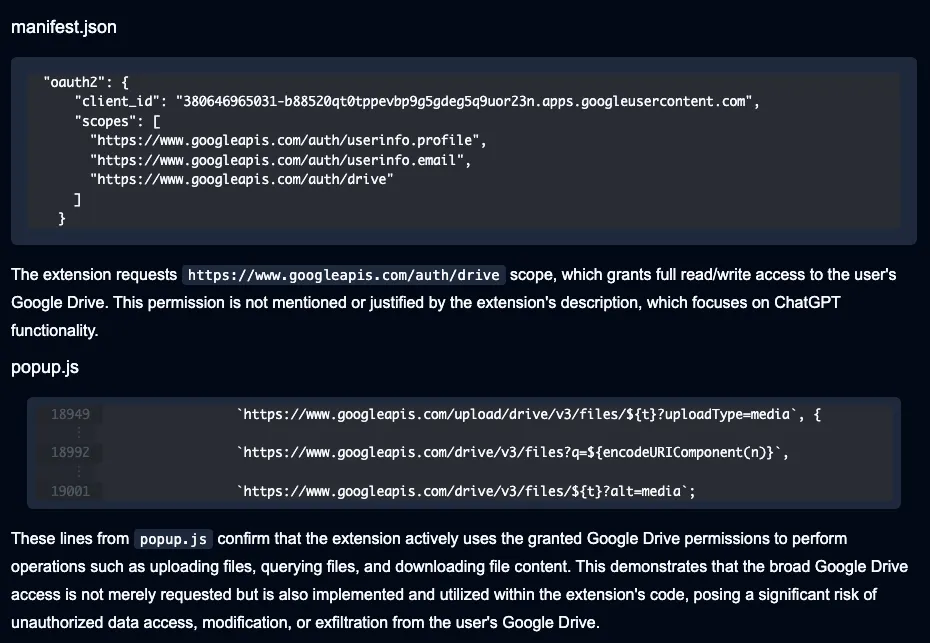
The extension also requests read/write access into Google, potentially creating pathways for unauthorized data access and exfiltration from victims’ Google Drive accounts.
The timeline:
- July 2024: Likely beginning of malicious activity
- Jan 13th, 2025: Discovered by Obsidian researchers and responsibly disclosed to OpenAI
- Jan 13th, 2025: OpenAI revokes compromised API keys
- Jan 21st, 2025 (today): Malicious extension still available in Chrome store
How the data exfiltration unfolds
Originally named ChatGPT Extension, and later renamed to H-Chat Assistant, this malicious extension impersonates ChatGPT to deceive users into providing their Open API keys.
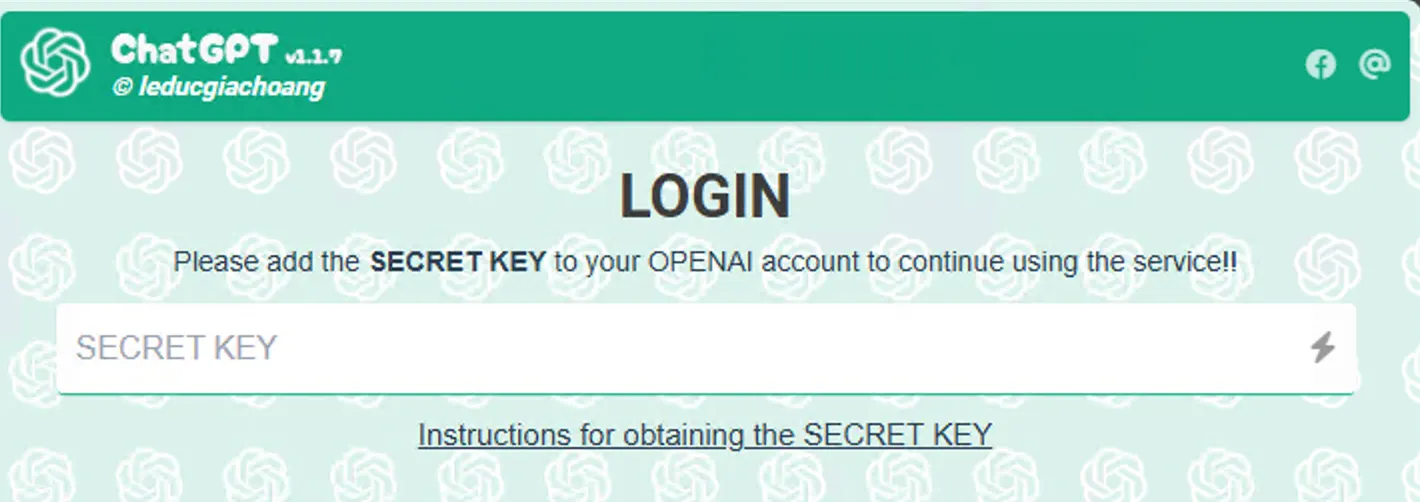
Once the extension is installed, users are prompted to add an OpenAI API key to interface with the chatbot. (Once provided, the extension does appear to function largely as advertised, allowing users to converse with ChatGPT models in their browser window).
The API key exfiltration occurs once a user deletes a chat or chooses to log out of the application. At that point, the user’s API key is exfiltrated via hardcoded Telegram bot credentials. The extension additionally contains the capability to interact with Google Drive, ostensibly for backup purposes. Code analysis via Secure Annex describes the risks associated with this functionality.
What customers should immediately consider:
- Short Term: Immediately blacklist and uninstall the malicious extension via Chrome browser console. Also revoke any access or integration this extension has to Google accounts.
- Long Term: Treat browser extensions as third-party applications instead of just end-user tooling. Organizations should inventory, assess, and continuously monitor browser extensions with the same rigor applied to SaaS and OAuth integrations. This includes enforcing allowlists, blocking unsigned or newly published extensions by default, and regularly reviewing extension permissions (especially those claiming access to developer tools or AI services.)