The Third-Party Vendor Access Problem: What the ConnectWise Attack Means for Your SaaS Security
See how the ConnectWise and Atera attacks exposed third-party app risks, how Obsidian detected the campaign, and how to protect your SaaS environment.
Recently, attackers used a software vendor’s own credentials to knock on the doors of Microsoft 365 environments around the world. No employee was phished and no password was guessed. The attacker simply held a key that third-party apps used to get in.
Huntress1, Todyl2,ConnectWise3 and Microsoft4 reported the ConnectWise side of this. Obsidian’s threat research team built on that work. Learning from activity metadata across our customers, we quickly found the same attacker holding a second vendor’s credential, from Atera, and tied it to the same campaign.
Microsoft has since attributed the campaign to Storm-09404, a China-state-aligned actor. The lesson for security leaders is one question: which integrations can access your critical SaaS data, and how would you know if someone was abusing that access?
Why a vendor’s credential is the perfect way in
Most of your security controls are built around people - passwords, MFA prompts, conditional access rules. A vendor’s app credential bypasses all of them. When the app signs in, there is no user, so there is no MFA prompt and no user policy to apply.
Think of it as a master key that belongs to the vendor and opens doors in many customer’s buildings. Whoever steals the key doesn’t need to pick any locks. For many third-party apps, the only built-in control a customer has is to switch the app off.
“Tenant spray”: one stolen key, thousands of doors
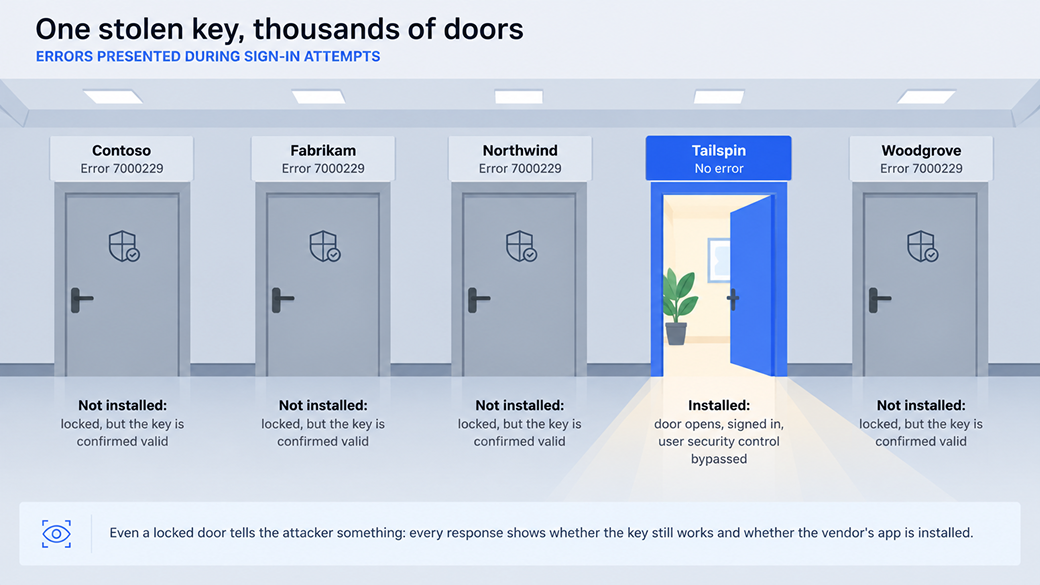
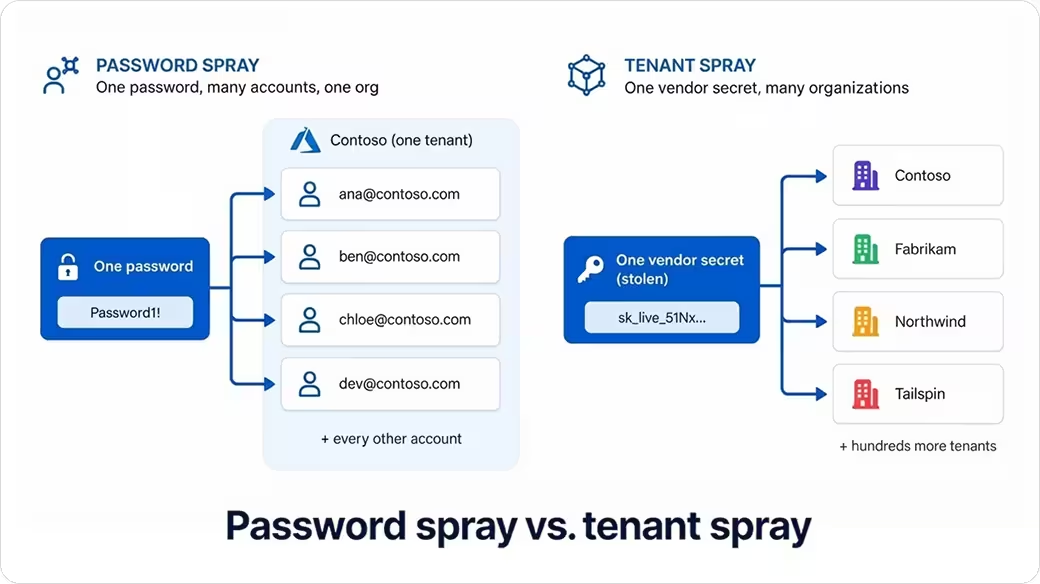
At Obsidian, we call this technique tenant spray. You may know password spraying, where an attacker tries one password against many accounts. Tenant spray turns that around. One stolen token credential is tried against organization after organization, including ones that never used the vendor at all.
Even failed attempts help the attacker. The response tells them whether the key works, and whether the vendor’s app is installed in that organization. Huntress identified almost 1,000 Microsoft tenants with sign-in activity from one of the attacker’s addresses.
In this case, the attacker did not stop at ConnectWise. We saw the same operator try a second vendor’s credential, from Atera, against the same organizations in the same order as the one ConnectWise runs. The attempts failed only because Atera wasn’t installed in those organizations. However, the response confirmed the Atera credential was valid. When we reached out to Atera, they confirmed they were already aware of the incident and was investigating this activity, had engaged external incident response specialists, and mitigated the attack. In addition, Atera services were not affected.
Why no single company could see the whole attack
Inside any one organization, this campaign looked like almost nothing. Most organizations didn’t have the app installed, so they saw only a few failed sign-ins. And failed sign-ins happen millions of times a day across the internet. Even in organizations where the app was installed, the signs were too faint to prove a compromise. An odd sign-in to a third-party app can mean an attack, but very often it means a user is attempting to login. In the past two months, Obsidian’s research team saw more than 20 third-party app credentials used outside their production infrastructure. That breaks good security practice, but none of them was an attack or resulted in any kind of a compromise.
These signals are noisy on their own. So, from inside a single organization, for a security team looking only at its own environment, there is no easy or automatic way to tell a quiet attack from a normal day.
How Obsidian connected the dots
Obsidian sees how each vendor integration behaves across many customers at once. That gives us a normal pattern for every app, and a way to spot abnormalities when they occur.
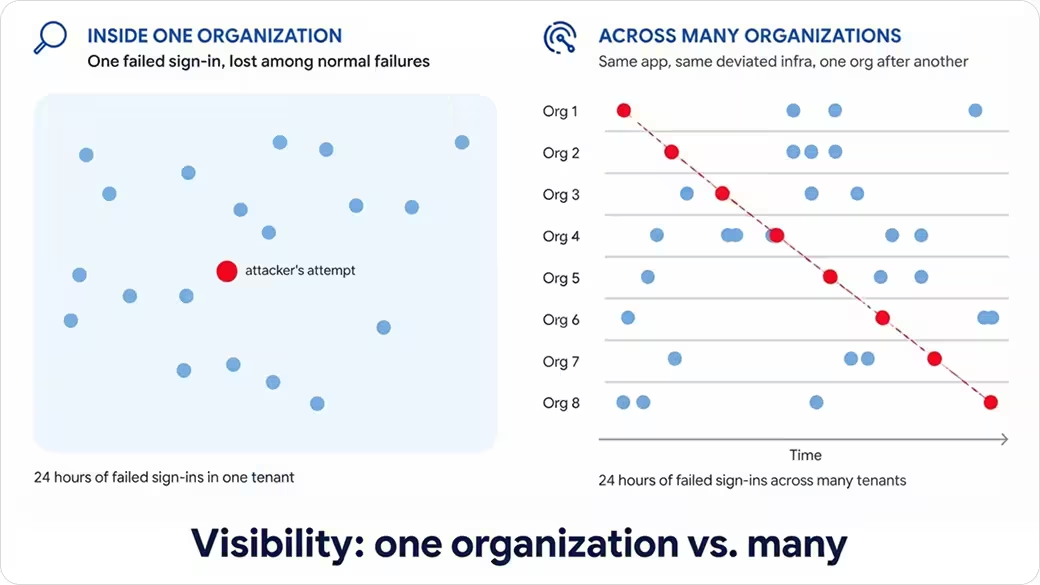
For ConnectWise, the pattern was clear. The app normally signed in only from Microsoft’s own network, with no identifying software tag. Suddenly it was signing in from rented hosting servers, using scripting tools, against organizations that never installed it, one after another in a fixed order. Each organization saw one small piece. However, when combined across customer networks, the pieces showed a sweep of more than a dozen organizations in about seven hours.
The same view lets us link the Atera integration to the campaign, because the target list and order matched. We matched the attacker’s servers to earlier password-spraying attempts, and found one IP still active a week after ConnectWise disabled its apps. Obsidian also found direct overlaps in indicators of compromise (IOCs) between the Atera activity and previously reported attacks.
This is what network intelligence means in practice: weak signals that are noise in one company become a confident detection when combined across many. Even organizations that never installed the vendor’s app contribute to and benefit from the network effect.
Fixing the ConnectWise and Atera problem
If your organization uses Microsoft 365, these steps close the door the attackers were testing.
- Switch off the ConnectWise apps: Disable existing affected ConnectWise enterprise applications, even if you see nothing unusual. Do not delete enterprise applications as the first response.
- Check Atera: Review sign-ins from the Atera app. Atera has rotated the credential we saw the attacker using, and says it contained the issue and that its services were not affected.
- Block the attacker’s servers: Our technical analysis lists the four addresses. One was still active a week after ConnectWise disabled its apps.
- Ask your vendors the hard questions: How often do they rotate the secrets their apps use, and can they show you where those apps normally sign in from?
Three questions to ask your team this week
Vendor credentials will keep leaking. What matters is whether you know which integrations could be used against you, and whether you would see it happen.
- Which third-party apps and integrations can reach our critical SaaS data, and what can each one do?
- Which of them do we no longer use? Those should be disabled so they can’t get access in our environment.
- If someone abused one of them tonight, how would we know?
Obsidian helps answer all three. Customers use it to inventory connected apps and integrations, flag the ones with high-risk permissions, and detect when an integration starts behaving differently. When a vendor discloses a compromise, teams can quickly see whether they are exposed and what to switch off.
Sources: 1 Huntress 2 Todyl 3 Connectwise incident status 4 Microsoft: Storm-0940 attribution